

Make your first API call
In this tutorial you call the HostRepute blacklist check API from a terminal: you create a team API token, list the domains and IPs your team monitors, add a new one, then check it against your blocklists and read the result. It takes about 10 minutes and uses 1 credit.
Before you begin
Section titled “Before you begin”- The Developer role or higher in the team. Owners, Admins, Managers and Developers can create API tokens; Viewers can’t.
- At least 1 credit for the blocklist check. A new team starts with 0 credits, and only the team’s Owner can buy them: read buy credits. Adding and listing domains is free.
- A domain or IP you’re allowed to add. The team’s plan limits how many it can monitor; see
plans and limits. The examples use
news.example.com; use your own. curl, andjqto pick values out of the JSON responses.
Create an API token
Section titled “Create an API token”-
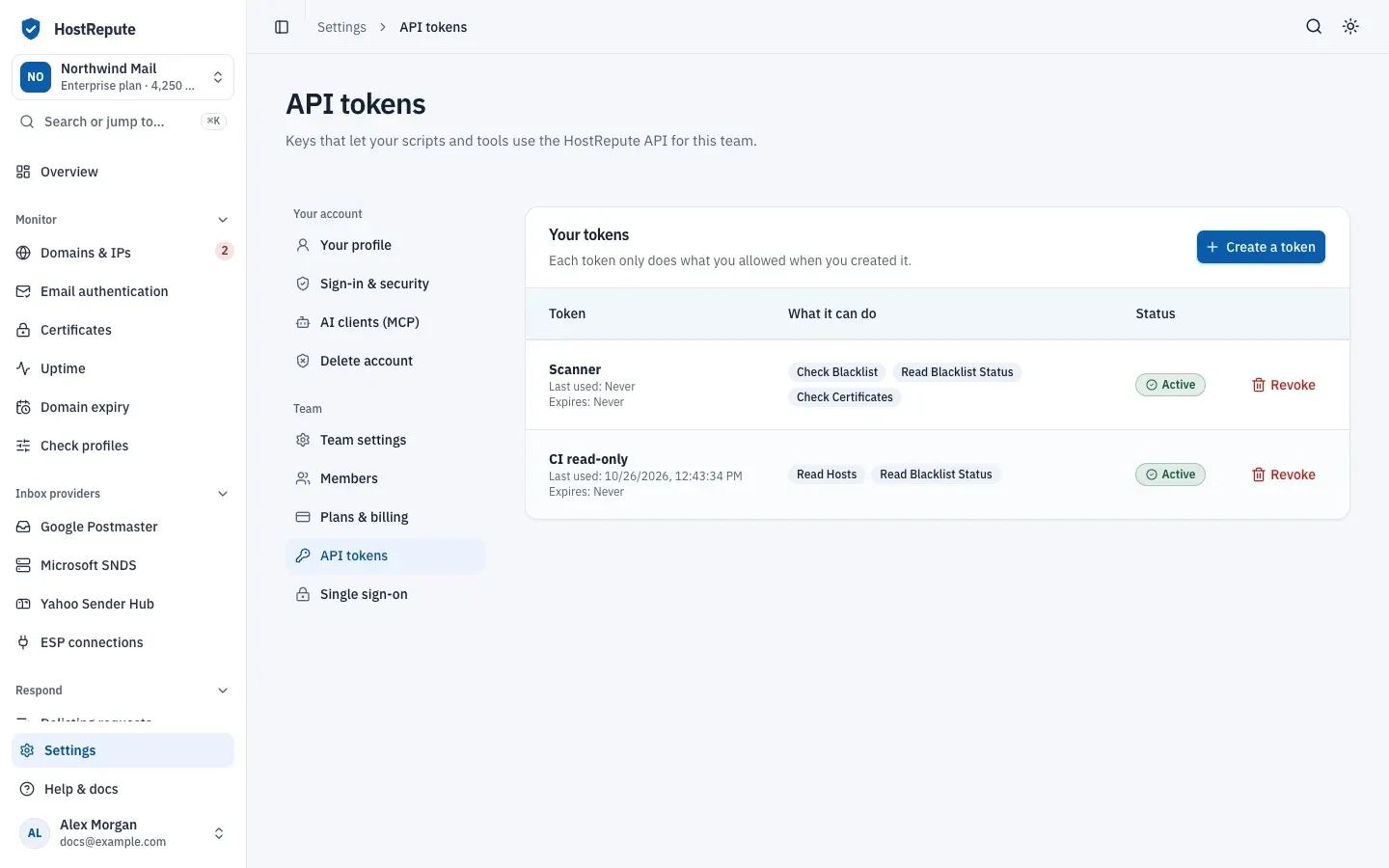
Open Settings, then API tokens and choose Create a token.
-
Enter a Name, for example “API quickstart”. Under Expires (optional), pick a date a few days ahead, so the token stops working on its own once you’re done.
-
Under What it can do, the form starts with every read and check ability selected. Choose Clear, then tick only the five abilities this tutorial needs. The search box finds them by name, for example
host:create.Ability Group in the form Tick the item marked host:readDomains & IPs Read host:createDomains & IPs Create data-source-group:readCheck profiles Read blacklist:checkBlocklist checks Check blacklist:readBlocklist checks Read -
Choose Create token.
-
Under Copy your new token now, choose Copy token, then I’ve saved it. It’s only shown once. If you lose it, revoke it and create another.
-
In your terminal, put the token in an environment variable, so the commands below can use it:
Terminal export HOSTREPUTE_TOKEN='paste-your-token-here'
List your domains and IPs
Section titled “List your domains and IPs”Every request goes to https://app.hostrepute.com/api/v1 and carries the token in the Authorization header.
curl "https://app.hostrepute.com/api/v1/hosts" \ -H "Authorization: Bearer $HOSTREPUTE_TOKEN" \ -H "Accept: application/json"The answer lists the domains and IPs your team monitors, which the API calls hosts:
{ "data": [ { "uuid": "01a178db-d582-717c-8bb6-f01625c3d70f", "name": "Mail server", "host": "mail.example.com", "blocklisted_at": null, "data_source_group": { "uuid": "01a178db-d581-700d-9729-4f4abc8cee72", "name": "Default", "slug": "default", "description": "All production domains", "is_default": true, "deliverability_checks_enabled": true, "deliverability_checks": [ "mx_health", "spf_record", "spf_strict", "spf_lookup_limit", "dmarc_record", "dmarc_strict" ], "created_at": "2026-07-14T09:12:44.000000Z", "updated_at": "2026-09-02T14:05:31.000000Z" }, "created_at": "2026-07-14T09:15:02.000000Z", "updated_at": "2026-07-14T09:15:02.000000Z" } ], "links": { "first": "https://app.hostrepute.com/api/v1/hosts?page=1", "last": "https://app.hostrepute.com/api/v1/hosts?page=1", "prev": null, "next": null }, "meta": { "current_page": 1, "from": 1, "last_page": 1, "links": [ { "url": null, "label": "« Previous", "page": null, "active": false }, { "url": "https://app.hostrepute.com/api/v1/hosts?page=1", "label": "1", "page": 1, "active": true }, { "url": null, "label": "Next »", "page": null, "active": false } ], "path": "https://app.hostrepute.com/api/v1/hosts", "per_page": 15, "to": 1, "total": 1 }}uuididentifies the domain or IP in later requests.blocklisted_atisnullwhile no blocklist lists it. Otherwise it’s the time of the latest monitoring scan that found it listed.data_source_groupis its check profile, which decides the blocklists it’s checked against.linksandmetapage through long lists, 15 items at a time. Read pagination.
An empty data list means the team doesn’t monitor anything yet. A 401 answer means the token is missing or wrong:
check the HOSTREPUTE_TOKEN variable.
Add a domain
Section titled “Add a domain”A new domain or IP needs a check profile. List your profiles and note the uuid of the one to use:
curl "https://app.hostrepute.com/api/v1/data-source-groups" \ -H "Authorization: Bearer $HOSTREPUTE_TOKEN" \ -H "Accept: application/json" \ | jq '.data[] | {uuid, name, is_default}'{ "uuid": "01a178db-d581-700d-9729-4f4abc8cee72", "name": "Default", "is_default": true}{ "uuid": "01a178db-d7b1-7394-ae88-b7a0aac5eaa4", "name": "Marketing IPs", "is_default": false}Then add the domain with that profile’s uuid, a name and the host:
curl -X POST "https://app.hostrepute.com/api/v1/hosts" \ -H "Authorization: Bearer $HOSTREPUTE_TOKEN" \ -H "Accept: application/json" \ -H "Content-Type: application/json" \ -d '{ "data_source_group_uuid": "01a178db-d581-700d-9729-4f4abc8cee72", "name": "News mail", "host": "news.example.com" }'HostRepute answers 201 with the new domain:
{ "data": { "uuid": "01a178db-d79e-7114-b468-89b175266ba2", "name": "News mail", "host": "news.example.com", "blocklisted_at": null, "data_source_group": { "uuid": "01a178db-d581-700d-9729-4f4abc8cee72", "name": "Default", "slug": "default", "description": "All production domains", "is_default": true, "deliverability_checks_enabled": true, "deliverability_checks": [ "mx_health", "spf_record", "spf_strict", "spf_lookup_limit", "dmarc_record", "dmarc_strict" ], "created_at": "2026-07-14T09:12:44.000000Z", "updated_at": "2026-09-02T14:05:31.000000Z" }, "created_at": "2026-10-26T15:37:15.000000Z", "updated_at": "2026-10-26T15:37:15.000000Z" }}The domain is now monitored, and adding it used no credits. HostRepute checks it at your team’s next scheduled check, not right away: unlike the portal, the API doesn’t queue a first scan for a new domain. The next step checks it now.
If the answer is 422 with “Your current plan cannot monitor more hosts.”, the team has reached its plan’s limit.
Remove a domain or IP, or change the plan.
Start a blocklist check
Section titled “Start a blocklist check”A blocklist check looks the domain or IP up on every blocklist in a check profile. Without
data_source_group_uuid, HostRepute uses the team’s default profile. The domain doesn’t have to be one your team
monitors.
curl -X POST "https://app.hostrepute.com/api/v1/blacklist/check" \ -H "Authorization: Bearer $HOSTREPUTE_TOKEN" \ -H "Accept: application/json" \ -H "Content-Type: application/json" \ -d '{"host": "news.example.com"}'The check starts in the background, and the answer comes back at once:
{ "data": { "uuid": "01a178db-d833-70d2-8436-d39da22fcd8a", "host": "news.example.com", "status": "processing", "is_completed": false, "callback_status": null, "data_source_count": 4, "completed_source_count": 0, "listed_data_source_count": 0, "failed_data_source_count": 0, "progress_percent": 0, "error_message": null, "data_source_group": { "uuid": "01a178db-d581-700d-9729-4f4abc8cee72", "name": "Default", "slug": "default", "description": "All production domains", "is_default": true, "deliverability_checks_enabled": true, "deliverability_checks": [ "mx_health", "spf_record", "spf_strict", "spf_lookup_limit", "dmarc_record", "dmarc_strict" ], "created_at": "2026-07-14T09:12:44.000000Z", "updated_at": "2026-09-02T14:05:31.000000Z" }, "started_at": "2026-10-26T15:37:16.000000Z", "completed_at": null, "created_at": "2026-10-26T15:37:16.000000Z" }}The check has cost 1 credit. Keep its uuid:
export SCAN_UUID='01a178db-d833-70d2-8436-d39da22fcd8a'If the answer is 402, the team doesn’t have enough credits and nothing was charged:
{ "message": "Insufficient credits.", "required_credits": 1, "available_credits": 0 }Each check you start this way costs a credit, so don’t resend a request that was answered with 201: poll the check
you have.
Wait for the result
Section titled “Wait for the result”Ask for the check’s status until status is completed or failed. This loop asks every 5 seconds and prints the
whole answer at the end:
while :; do body=$(curl -sS "https://app.hostrepute.com/api/v1/blacklist/status/$SCAN_UUID" \ -H "Authorization: Bearer $HOSTREPUTE_TOKEN" \ -H "Accept: application/json") scan_status=$(printf '%s' "$body" | jq -r '.data.status') echo "Status: $scan_status" case "$scan_status" in pending | processing) sleep 5 ;; *) break ;; esacdoneprintf '%s\n' "$body" | jq .While the check runs, completed_source_count and progress_percent show how far it has got. The loop also stops on
an error answer, where status prints as null; the printed body then says what went wrong.
Instead of polling, a script can pass a callback_url when it starts the check, and HostRepute calls it when the check
ends. Read run checks and wait for results.
Read the result
Section titled “Read the result”A finished check looks like this one, where 1 of 4 blocklists lists the domain:
{ "data": { "uuid": "01a178db-d833-70d2-8436-d39da22fcd8a", "host": "news.example.com", "status": "completed", "is_completed": true, "callback_status": null, "data_source_count": 4, "completed_source_count": 4, "listed_data_source_count": 1, "failed_data_source_count": 0, "progress_percent": 100, "error_message": null, "result": { "host": "news.example.com", "data_sources": [ { "data_source_id": 81, "data_source_name": "black.uribl.com", "data_source_host": "black.uribl.com", "source_status": "completed", "is_listed": true, "details": [ { "host": "news.example.com.black.uribl.com", "class": "IN", "ttl": 300, "type": "A", "ip": "127.0.0.2" } ], "error": null }, { "data_source_id": 82, "data_source_name": "dbl.nordspam.com", "data_source_host": "dbl.nordspam.com", "source_status": "completed", "is_listed": false, "details": [], "error": null }, { "data_source_id": 87, "data_source_name": "grey.uribl.com", "data_source_host": "grey.uribl.com", "source_status": "completed", "is_listed": false, "details": [], "error": null }, { "data_source_id": 89, "data_source_name": "multi.surbl.org", "data_source_host": "multi.surbl.org", "source_status": "completed", "is_listed": false, "details": [], "error": null } ], "listed_count": 1, "total_count": 4, "failed_count": 0, "skipped_count": 0, "is_listed": true, "relisted_detected": false }, "data_source_group": { "uuid": "01a178db-d581-700d-9729-4f4abc8cee72", "name": "Default", "slug": "default", "description": "All production domains", "is_default": true, "deliverability_checks_enabled": true, "deliverability_checks": [ "mx_health", "spf_record", "spf_strict", "spf_lookup_limit", "dmarc_record", "dmarc_strict" ], "created_at": "2026-07-14T09:12:44.000000Z", "updated_at": "2026-09-02T14:05:31.000000Z" }, "started_at": "2026-10-26T15:37:16.000000Z", "completed_at": "2026-10-26T15:37:31.000000Z", "created_at": "2026-10-26T15:37:16.000000Z" }}result.is_listedistruewhen at least one blocklist lists the domain or IP, andresult.listed_countsays how many ofresult.total_countdo.- Each entry in
result.data_sourcesis one blocklist.is_listedis its answer, anddetailsholds the DNS record the blocklist returned for a listing. - A blocklist that didn’t answer has
source_statusfailedand anerror, and counts inresult.failed_count.error_messagethen says how many failed. A blocklist that didn’t answer hasn’t listed you. relisted_detectedistruewhen a blocklist lists the domain or IP again after a delisting request for that listing was resolved.
When no blocklist answered at all, status is failed and result holds only an error, such as “All data sources
failed for this scan.” A failed check is a warning, not a listing, and its credit is refunded. Try again later.
If the domain is listed, read get a listing removed. HostRepute guides you through each blocklist’s removal process but never submits a request for you.
What you built
Section titled “What you built”- A team API token that can read and add domains and IPs, read check profiles, and run and read blocklist checks.
- A new monitored domain,
news.example.com, that HostRepute checks on the team’s schedule at no credit cost. - A finished blocklist check of that domain, for 1 credit, and a loop that waits for any check’s result.