

Get warned before a domain expires
Domain expiry monitoring in HostRepute reads each domain’s registration expiry date from its public WHOIS record once a day and warns you before the registration lapses. A lapsed domain takes your email and websites down with it, and after a grace period you can lose the domain, so add every domain you send email from or run a site on.
Before you begin
Section titled “Before you begin”- Room on your plan. Each domain you keep checking counts toward your plan’s limit. Compare the limits in Plans and limits.
- The Developer role or higher to add, change and delete domains. Viewers can see every result.
- The registered domain. Enter the domain you registered, like
example.com, not a host name inside it.
Add a domain
Section titled “Add a domain”-
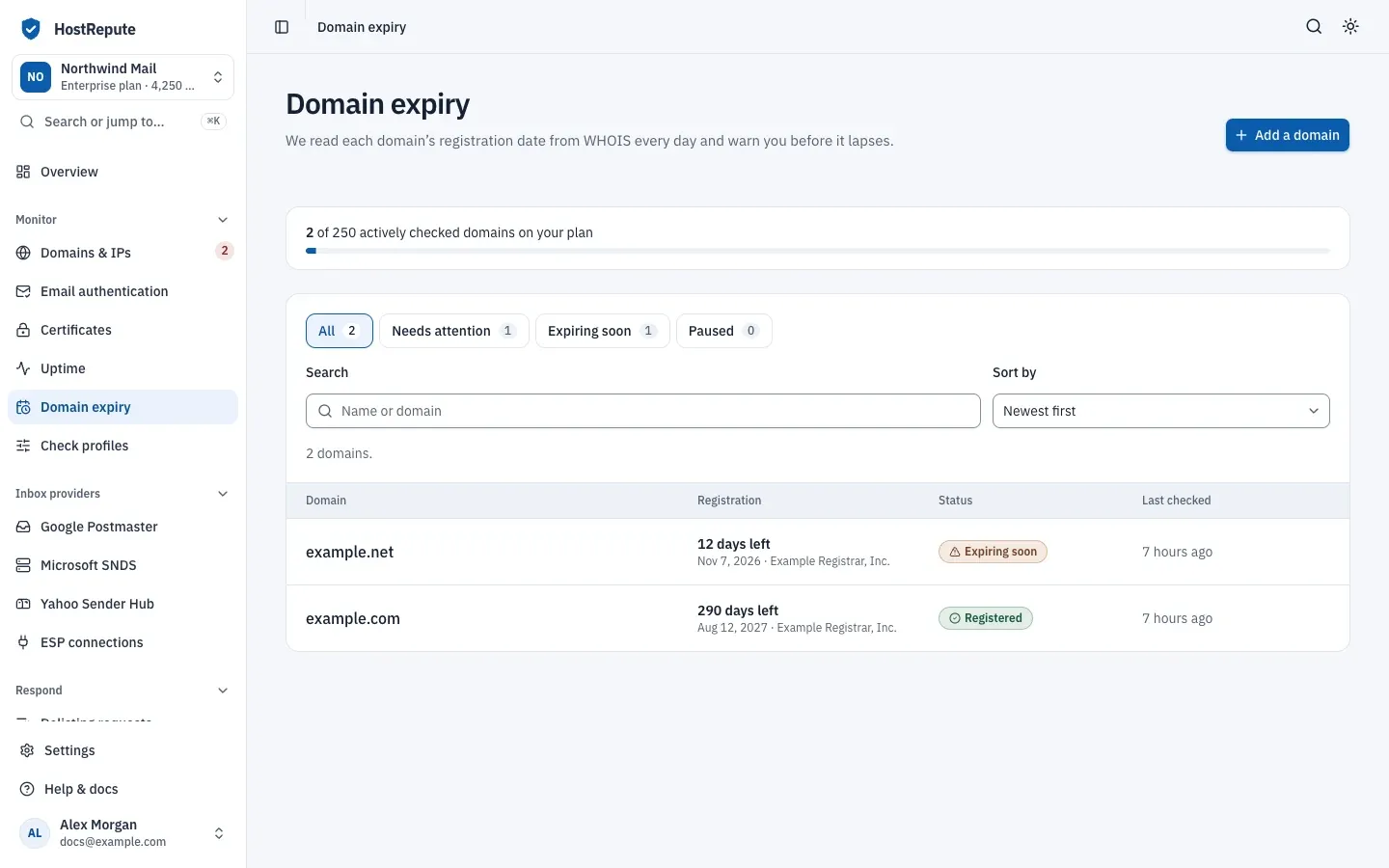
Open Monitor, then Domain expiry and choose Add a domain.
-
Enter the Domain. If you paste a URL, HostRepute keeps only the host name and shows which one it will check.
-
Optionally give it a Name (optional). Alerts show it; it defaults to the domain.
-
Leave Start checking it right away on. When your plan’s limit is reached, the switch is off and the domain is added paused.
-
Choose Add domain. The domain’s page opens.
-
Choose Check now to read its WHOIS record right away. Otherwise, the first check runs at the next daily pass.
How the daily check works
Section titled “How the daily check works”Once a day, HostRepute checks every domain whose last check is at least 24 hours old. It spaces the WHOIS lookups a few seconds apart to respect the registries’ rate limits, then compares the expiry date with the warning thresholds:
- 30, 14 and 7 days before expiry, for every domain. The portal has no setting to change them.
- A domain inside the largest threshold is Expiring soon; one whose date has passed is Expired.
| Status | Meaning |
|---|---|
| Not checked yet | No WHOIS check has finished yet. Checks run every 24 hours. |
| Registered | WHOIS shows an expiry date further away than the largest warning threshold (30 days by default). |
| Expiring soon | The registration expires within the largest warning threshold. HostRepute alerts you then and again as each smaller threshold is reached (30, 14 and 7 days by default). |
| Expired | The expiry date in WHOIS has passed. |
| Expiry date unknown | WHOIS answered but showed no expiry date, so HostRepute can't warn before the domain lapses. A WHOIS server that doesn't answer or limits the lookup is retried instead. |
| Paused | Checks are turned off; it keeps its last result. |
A WHOIS server that doesn’t answer, refuses the connection or says it’s rate limiting doesn’t change the status: HostRepute tries again after 1, 5 and 15 minutes, and otherwise at the next daily pass. Only a WHOIS record that answers without an expiry date gives Expiry date unknown.
Alerts you get
Section titled “Alerts you get”When a check finds a domain newly Expiring soon, at a smaller threshold than before, Expired, or registered again after
a renewal, HostRepute alerts every active alert channel. Webhook
channels receive the alert.domain_expiry_status_changed event (webhook events). The
same alert isn’t sent twice on the same day. Delivery hours apply; a team without any
active alert channel gets these alerts by email to its Owner.
Read a domain’s page
Section titled “Read a domain’s page”- The panel at the top says how long the registration has left and what to do, for example to renew with the registrar before the date.
- Registration shows when it Expires, the Time left and the Registrar.
- Every check lists each WHOIS check, newest first, with what went wrong when a check failed.
- Settings lets you change the name and the domain, and turn Keep checking it off to pause the daily checks. The history stays. Choose Resume checks to start again; that needs room on your plan.
Check now and Check again use no credits; you can start up to 6 a minute. Deleting a domain under Danger zone deletes its check history for good. The domain itself isn’t affected.
Check that it worked
Section titled “Check that it worked”- The list shows the domain’s status, its expiry date and its registrar.
- Its page shows a recent check under Every check.
Troubleshooting
Section titled “Troubleshooting”- Still Not checked yet. The daily pass hasn’t run since you added it, or it’s paused. Choose Check now.
- Expiry date unknown. The WHOIS record has no expiry date. Make sure you entered the registered domain, then check the date with your registrar.
- “Your current plan cannot monitor more domains.” You reached the plan’s limit. Pause or delete another domain, or change your plan.
- Expiring soon although it renews automatically. WHOIS still shows the old date. Check that the renewal ran and that the payment card on file with the registrar is still valid; the status changes after the next check.
- The list says Nothing matches these filters. Choose Clear filters.