

Check an email before you send it
Campaign preflight is an email spam test before sending: you give HostRepute the raw source of one campaign email, and it checks the email’s authentication, links, content and structure, scores it with a spam filter, and lists what to fix, worst first. Use it on the final version of a newsletter or announcement before it goes to your list.
Before you begin
Section titled “Before you begin”- 1 credit per check, from the team’s balance. A check that can’t finish is refunded. Credit costs lists every cost.
- The Developer role or higher to start a check. Other roles see past checks only.
- The email’s full source, headers included. In most mail apps, open the email and choose “Show original” or “View
source”, or save it as an
.emlfile. For the authentication results, use a copy you received: send a test to your own mailbox first. HostRepute reads SPF, DKIM and DMARC from the Authentication-Results header that the receiving server adds, and a copy exported before sending doesn’t have one. These are Sender Policy Framework (SPF), DomainKeys Identified Mail (DKIM) and DMARC, the checks that tell a mailbox provider the email really comes from your domain. - A plan or the trial. A team without one sees Choose a plan to start monitoring again instead of this page.
Check an email
Section titled “Check an email”-
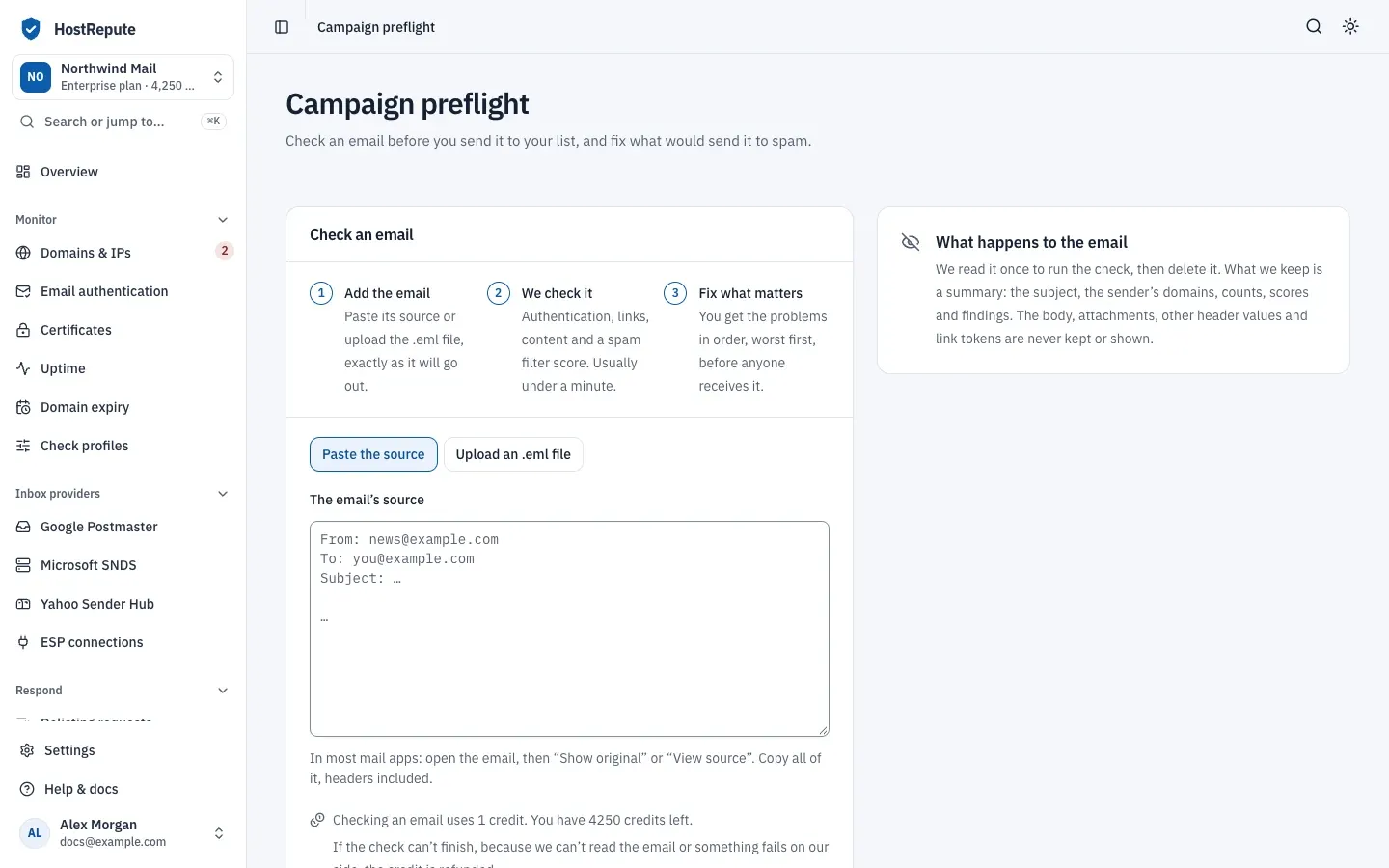
Open Respond, then Campaign preflight.
-
Under How to add the email, choose one of the two:
- Paste the source, then paste everything into The email’s source.
- Upload an .eml file, then choose Choose a file, or drop it here for
The .eml file. Only
.emlfiles are accepted.
Either way, the email can be up to 2,048 KB.
-
Choose Check this email. The credit is used straight away and the result page opens.
-
Wait for the result. The page shows Checking your email… and updates by itself; a check usually takes less than a minute. You can leave the page: the check keeps running and appears under Past checks.
Read the result
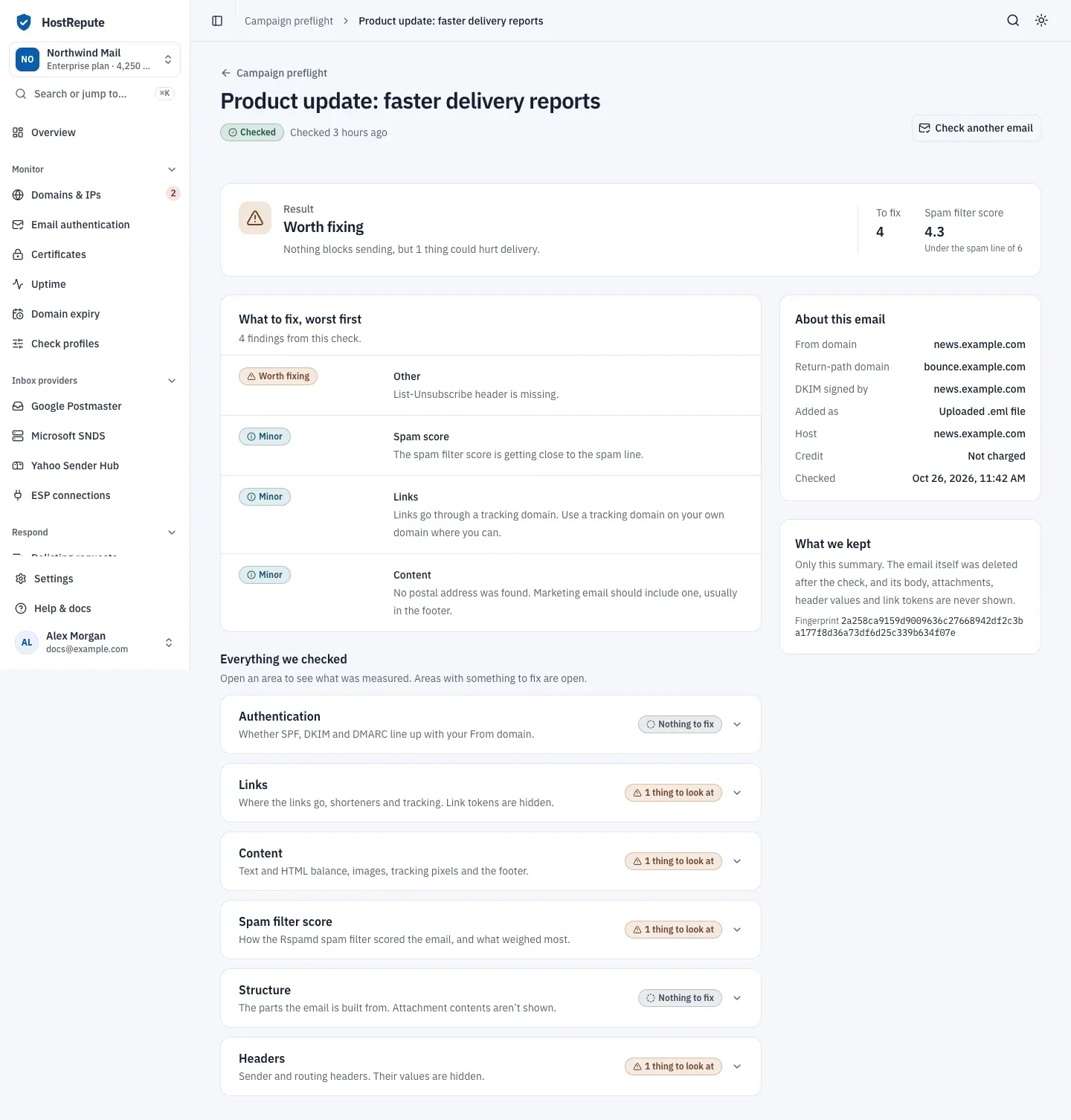
Section titled “Read the result”The top of the result answers whether you can send the email. Its Result is one of these:
| Status | Meaning |
|---|---|
| Fix before sending | At least one high-severity finding could send the email to spam or get it rejected. |
| Worth fixing | No high-severity finding, but at least one medium one could hurt delivery. |
| Looks good | No high- or medium-severity findings; minor findings and notes may still be listed. |
Next to it, To fix counts the findings that ask you to change something, and Spam filter score shows the spam filter’s score and whether it’s under the spam line.
What to fix, worst first lists those findings, each with what to do. Their severities:
| Status | Meaning |
|---|---|
| Fix before sending | High severity: a problem that could send the email to spam or get it rejected, such as misaligned DKIM, an image-only message or a link whose text shows a different domain. |
| Worth fixing | Medium severity: something that could hurt delivery but doesn't block sending. |
| Minor | Low severity: a small improvement. |
| Note | Informational: checked, nothing to change. |
Everything we checked has one area per part of the check. Areas with something to fix start open; the others say Nothing to fix.
| Area | What HostRepute checks |
|---|---|
| Authentication | Whether the bounce address (Return-Path) and the DKIM signing domains line up with your From domain, and the SPF, DKIM and DMARC results in the Authentication-Results header. Without the sending server’s IP, SPF can’t be checked again. |
| Links | Where the links go: URL shorteners, tracking links, link text that shows one domain but goes to another, and the result of opening each link. |
| Content | A plain-text version next to the HTML, HTML size and the balance of HTML to text, image-only emails, tracking pixels, forms, and a postal address. |
| Spam filter score | How the Rspamd spam filter scored the email, and the rules that weighed most. |
| Structure | The parts the email is built from. Attachment contents aren’t shown. |
| Headers | Sender and routing headers, without their values, including a missing or broken List-Unsubscribe header. |
About this email shows the From domain, the return-path domain, the domains that signed the email with DKIM, whether you pasted or uploaded it, and whether the credit was charged or refunded.
How links are checked
Section titled “How links are checked”HostRepute opens each http and https link in the email the way a reader’s click would, with a GET request from
the user agent HostRepute-CampaignPreflight-LinkScanner/1.0, and follows its redirects. It skips unsubscribe links and
any link whose address suggests an action, such as opt-out, remove, delete, confirm, verify, activate, reset-password or
manage-preferences, so the check never unsubscribes or confirms anything. It doesn’t open links that point to a private
network or to localhost, and it stops at a response larger than 256 KB.
| Setting | Default | How to change |
|---|---|---|
Email to check (pasted, or an uploaded .eml file) | 2,048 KB (2 MB) | Fixed |
| Links checked per email | The first 100 links | Fixed |
| Redirects followed per link | 5 redirects | Fixed |
Links after the first 100 aren’t opened, and a link that redirects more than 5 times is reported as blocked. Each request waits at most 2 seconds to connect and 5 seconds for an answer.
Check statuses
Section titled “Check statuses”Past checks and each result show the status of the check:
| Status | Meaning |
|---|---|
| Checking | The check is running; it usually takes less than a minute. |
| Checked | Every part of the check ran. |
| Partly checked | Some parts didn't run, for example authentication alignment or spam scoring, so the result may miss problems. What did run is shown. |
| Couldn’t check | The check stopped: the email couldn't be read, it took too long, or something failed on HostRepute's side. The credit is refunded. |
A check that is Partly checked keeps its credit. Only a check that couldn’t finish is refunded.
What HostRepute keeps
Section titled “What HostRepute keeps”The page puts it this way: “We read it once to run the check, then delete it. What we keep is a summary: the subject, the sender’s domains, counts, scores and findings. The body, attachments, other header values and link tokens are never kept or shown.” The email is deleted as soon as the check ends. If a check is still running after 24 hours, HostRepute stops it, marks it Couldn’t check, refunds the credit and deletes the email. What we kept on the result shows a fingerprint of the email (its SHA-256 hash), so you can tell two checks of the same file apart.
Check that it worked
Section titled “Check that it worked”- The check appears under Past checks with its Result, Spam score and the time it was Checked.
- About this email on the result says the credit was charged.
Troubleshooting
Section titled “Troubleshooting”- “Paste a raw email or upload an .eml file.” The form was empty. Paste the source or choose a file.
- “Use either pasted raw email or an .eml upload, not both.” Keep one of the two.
- The file is refused. It must end in
.emland be no larger than 2,048 KB. Save the email from your mail app as.eml, or paste its source. - Check this email is greyed out, and the credit line says you don’t have enough. The team’s balance is under 1 credit. The Owner can buy more credits with Get more credits.
- “Your role can see past checks but can’t start new ones.” Ask a team member with the Developer role or higher to run the check.
- Couldn’t check: “We couldn’t read this as an email.” The source is incomplete. Paste
the full source including the headers, or upload the
.emlfile. The credit was refunded. - Couldn’t check: “The check took too long and was stopped.” Choose Try again. The credit was refunded.
- “This is taking longer than usual.” The check keeps running. Choose Look again in a minute.
- The authentication findings say there’s no Authentication-Results header. You checked a copy that was never delivered. Send a test to your own mailbox and check the copy you received.
- The spam filter score shows a dash and the check is Partly checked. The spam filter couldn’t score the email; the result shows what the other parts of the check found. The credit isn’t refunded for a partial check.
- No emails checked yet means no one in the team has checked an email yet.
Related
Section titled “Related”- Check SPF, DKIM, DMARC and more for the DNS records behind authentication
- Email authentication checks
- Credit costs
- Statuses and what they mean
- Get a listing removed