

How the reputation score works
The reputation score is HostRepute’s domain reputation score: one number from
0 to 100 for each domain or IP, built from its blocklist results and the other signals HostRepute has for it. It sums up
at a glance how a domain or IP looks to the services that receive its mail, and its breakdown shows what pulls it
down. This page explains how the number is made, version domain-health-v3 of the rubric.
How the score is calculated
Section titled “How the score is calculated”- A domain or IP needs a completed blocklist scan to get a score. Until it has one, its card reads Waiting for results.
- Each signal that has data gets a part score from 0 to 100, as described in The signals.
- The score is the average of those part scores, weighted by how much each signal counts: blocklists 45, email authentication 25, certificates 15, and Google Postmaster Tools for a domain or Microsoft SNDS for an IP 10. A signal without data is left out of the average, so it lowers the confidence, not the score.
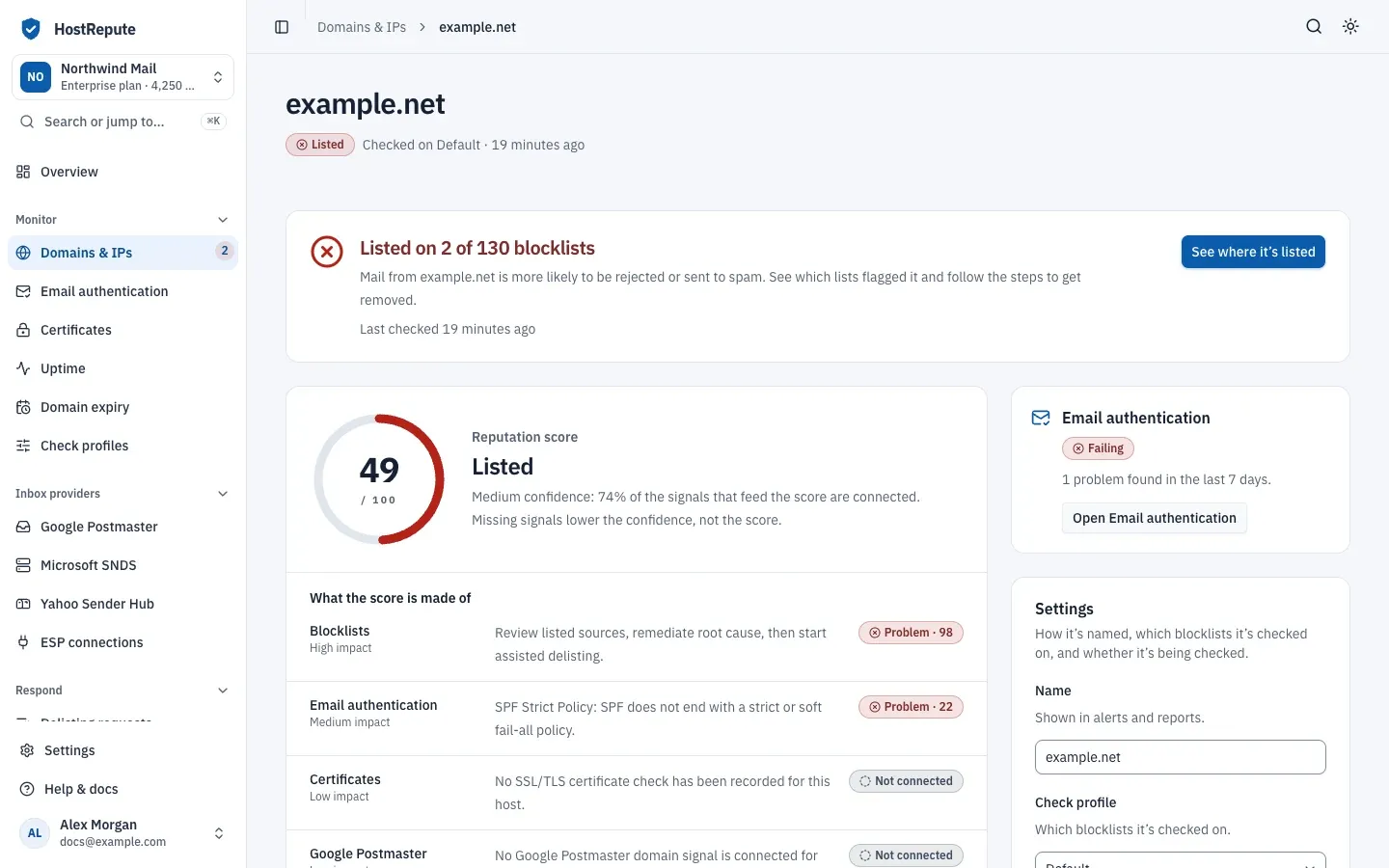
- While its latest completed scan finds the domain or IP on any blocklist, its score is capped at 49 and its tier is Listed, whatever the other signals say.
- The tier and the letter grade follow from the score.
The score you see is worked out from the latest data each time you open the page. After every finished scan, HostRepute also saves the score at that moment, which builds the score’s history.
For example, take a domain listed on 2 of the 130 blocklists in its check profile, one of them Spamhaus. Its blocklist part scores 98, and its email authentication part 22, from 3 failing checks and 3 that need work. The weighted average is (98 × 45 + 22 × 25) ÷ 70 = 71, and the listing caps it at 49. Two of its four signals have data, 70 of the 95 points of weight, so its confidence is Medium, 74%.
The signals
Section titled “The signals”| Signal | Weight | Applies to | Part score |
|---|---|---|---|
| Blocklists | 45 | Every domain and IP | 100 minus the share of blocklist weight that lists it, counting only the blocklists that answered in its latest completed scan. Each blocklist has a score weight from 1 to 10, so a listing on a major list such as Spamhaus pulls harder than one on a minor list. |
| Email authentication | 25 | Domains and IPs with an email authentication check | 100, minus 18 for each failing check and 8 for each check that needs work, from its latest email authentication check. |
| Certificates | 15 | Domains and IPs with a certificate check for the same name | The security score behind the grade of its latest certificate check, the check whose address or server name (SNI) matches. |
| Google Postmaster | 10 | Domains whose domain, or parent domain, is connected | 100, minus points for a Gmail spam rate from 0.1% (10; 20 from 0.3%; 40 from 1%), for each of the SPF, DKIM and DMARC success rates below 95% (10 each), for delivery errors from 2% (10; 25 from 5%) and for compliance items that need work (8 each, at most 20). |
| Microsoft SNDS | 10 | IPs with SNDS data | 100, minus points for an IP status of Blocked or Bot (55), Junked (35) or Unknown (10), for a red (40), yellow (15) or unknown (5) filter result, for a complaint rate from 0.3% (12; 25 from 1%) and for spam-trap hits (25 plus 5 per hit, at most 50). |
No part score goes below 0. Google Postmaster Tools is Google’s view of how Gmail treats your domain’s mail, and
Microsoft SNDS (Smart Network Data Services) is Outlook.com’s data about mail from your IPs; connect them in
Google Postmaster and Microsoft SNDS. A
domain’s Postmaster data is matched on the domain itself first, then its parent: mail.example.com, then
example.com. Because Postmaster counts only for domains and SNDS only for IPs, a domain or IP has at most four
signals, worth 95 points of weight. Every blocklist’s score weight is listed in
Blocklists HostRepute checks.
What each signal’s badge means
Section titled “What each signal’s badge means”On a domain or IP’s page, What the score is made of lists each signal with its main finding and how much it counts: High impact for blocklists, Medium impact for email authentication and Low impact for the others. Its badge shows its status and, when it has one, its part score, for example “Good · 92”.
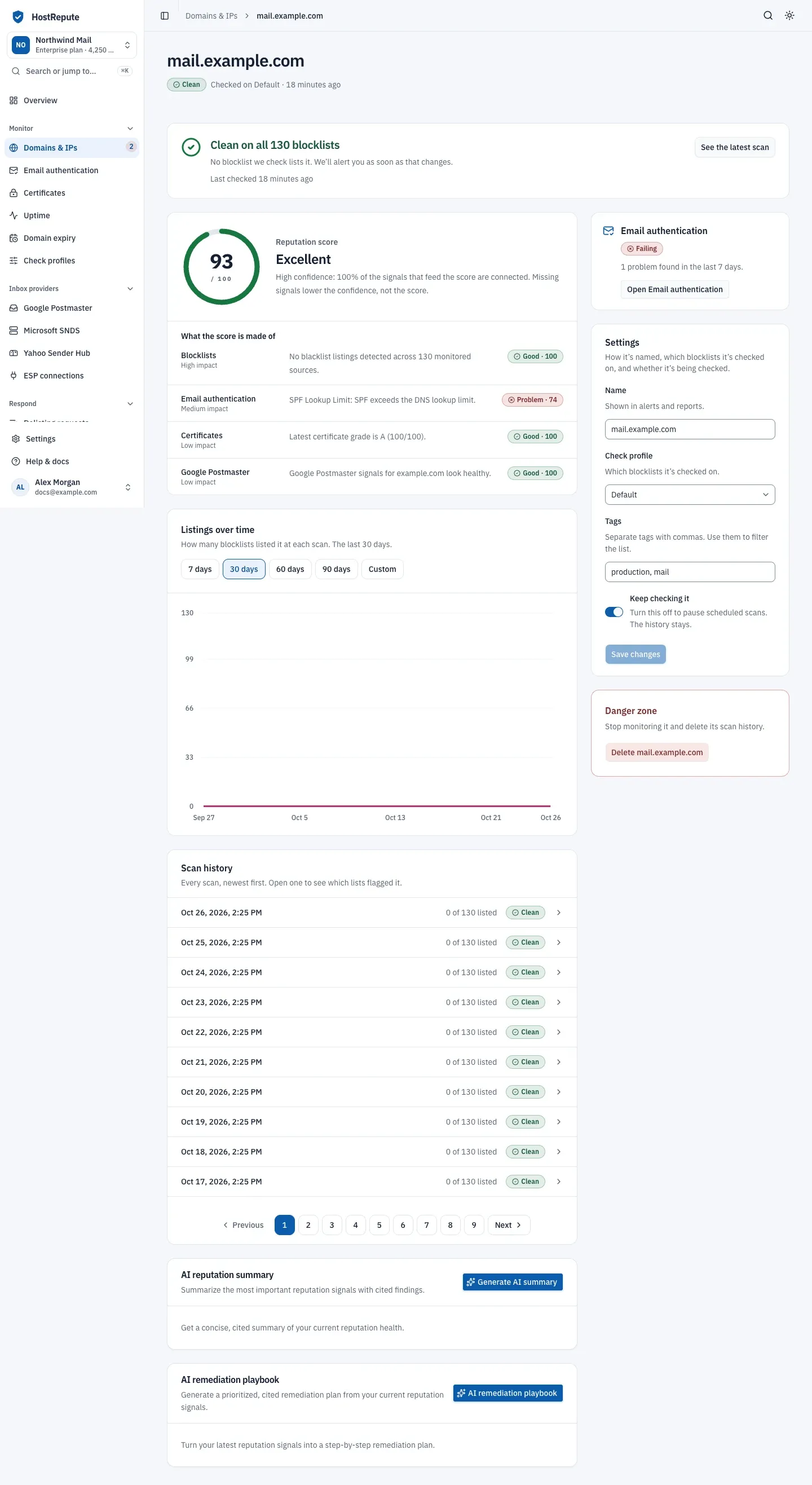
- The reputation score and what it’s made of.
- The scan history.
- The email authentication summary.
| Status | Meaning |
|---|---|
| Good | The signal looks healthy: no listing for Blocklists, no failing or needs-work checks for Email authentication, and a part score of 90 or more for Certificates, Google Postmaster and Microsoft SNDS. |
| Needs work | Email authentication has checks that need work but none failing, or the certificate, Google Postmaster or Microsoft SNDS part score is 70 to 89. Blocklists never show this. |
| Problem | Blocklists: listed on at least one. Email authentication: at least one failing check. Certificates, Google Postmaster, Microsoft SNDS: part score below 70. |
| Not connected | There's no data for this signal yet, for example no email authentication check, certificate check, Postmaster domain or SNDS data for it. It lowers the confidence, not the score. |
| Waiting for data | Blocklists only: there's no completed scan yet, or the latest scan had no blocklists to check. The score stays empty until there is one. |
Waiting for data and Not connected both mean a signal has no part score, but they aren’t the same:
- Waiting for data applies only to blocklists, the one signal the score can’t do without. There is no completed scan yet, or the latest one had no blocklists to check, so there is no score at all until a scan finishes.
- Not connected applies to the other signals. HostRepute has no email authentication check, certificate check, Google Postmaster domain or Microsoft SNDS data for this domain or IP. The score is worked out without it, and the confidence is lower. Run an email authentication check, add a certificate or connect an inbox provider to fill it.
The score’s tier is the label next to the number:
| Status | Meaning |
|---|---|
| Pending | There's no completed blocklist scan yet, so there's no number. The score card reads Waiting for results. |
| Listed | At least one blocklist lists it in the latest completed scan. The score is capped at 49 while it's listed; on the dashboard, any listed domain or IP makes the overall tier Listed even when the average is higher. |
| Critical | Below 50 with no listing: other signals, such as email authentication or certificates, pull the score down. |
| Review | 50 to 74 with no listing. |
| Good | 75 to 89 with no listing. |
| Excellent | 90 to 100 with no listing. |
The cap of 49 applies to each domain or IP. The team’s score on the Overview is the average of the scores of your domains and IPs, so it can be above 49 while one of them is listed; its label then reads Listed anyway.
Letter grades
Section titled “Letter grades”The letter grade uses its own cutoffs, separate from the tiers, after rounding the score down:
| Status | Meaning |
|---|---|
| A | A reputation score of 90 to 100. Grades use their own cutoffs, separate from the tiers, after rounding the score down. The public report badge shows the score and grade, for example 92 / A. |
| B | 75 to 89. |
| C | 55 to 74. |
| D | 40 to 54. |
| F | 0 to 39. A domain or IP without a score gets no grade, never an F. |
Confidence
Section titled “Confidence”Confidence says how much of the picture the score is based on: the share of the possible weight whose signals have data. The card puts it this way: “Missing signals lower the confidence, not the score.”
| Status | Meaning |
|---|---|
| High | Signals with data carry at least 80% of the possible weight, for example blocklists, email authentication and certificates (85 of 95). Weights: blocklists 45, email authentication 25, certificates 15, and Google Postmaster (domains) or Microsoft SNDS (IPs) 10. |
| Medium | 60% to 79% of the weight has data, for example blocklists and email authentication (70 of 95). |
| Low | Some data, but under 60% of the weight, for example blocklists alone (45 of 95). |
| Pending | No signal has data yet. On the dashboard the percentage is the average over all your domains and IPs. |
Where you see the score
Section titled “Where you see the score”- On a domain or IP’s page, Reputation score shows the score, its tier, its confidence and the breakdown. While the domain or IP is paused, the score is greyed out.
- On the Overview, the team’s score is the average of every domain and IP that has a score, and Score over time charts its daily average for up to 90 days.
- On a scan’s page, Reputation score over time charts the score saved after each finished scan. A failed scan adds no point.
- On shared reports and their badge, which show the score saved with the report.
The badge’s own scale
Section titled “The badge’s own scale”A shared scan report has a badge image at /reports/r/<report ID>/badge.svg that reads “Reputation” and the score with
its grade, for example 92 / A, or pending without a score. Its color follows the tier saved with the report: green
for Excellent, blue for Good, amber for Review, red for Listed and Critical, and gray without a score. Only a report
saved without a tier falls back to the badge’s own scale, which uses other cutoffs and has no Critical tier:
| Status | Meaning |
|---|---|
| Excellent | On the badge's own scale: a score of 90 or more with no listing, shown green. The badge uses this scale only for reports saved without a reputation tier; other reports color the badge by their reputation score tier. |
| Good | On the badge's scale: 70 to 89 with no listing, shown blue. |
| Review | On the badge's scale: 50 to 69 with no listing, shown amber. |
| Listed | On the badge's scale: any listing, or a score below 50, shown red. This scale has no separate Critical tier. |
| pending | The report has no score yet, so the badge reads pending in gray. |
The badge image is cached for up to an hour, so a change can take that long to show where it’s embedded.
Raise the score
Section titled “Raise the score”- Get delisted first. Nothing else lifts a listed domain or IP above 49. Start from the scan that found the listing; Get a listing removed walks through it.
- Fix failing email authentication checks. Each failing check costs that part 18 points, each one that needs work 8.
- Connect the missing signals for a score you can trust: a certificate check for the domain’s name, Google Postmaster Tools for domains and Microsoft SNDS for IPs. A new signal can raise or lower the score, and it always raises the confidence.
- Keep certificates strong. A weak or failing certificate grade pulls its part down.